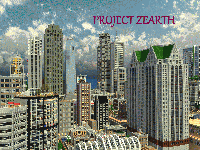
This is project Zearth. The project is basically a very big map with many cities that are a spread around the whole map. Currently I have made 5 major cities and many villages. Some of the villages are big and some are small, but the complexity of this map brings an amazing atmosphere to the map. All the cities are linked to each other by tracks or roads.
More than 90% of the structures/buildings are decorated inside, so it wont be boring exploring the map.
This map update is 1 year old and the version i currently am working on is set to be released in summer or so. It has been under huge renovation and has potensiall to become top 10 city map in minecraft
Home page PMC post V.12 will be out this summer




 ♫ La La La La La ♫
 Xoyjaz
 CougarNick24 22 August 2020
xyz1664 wrote:
Merci, mais vous devriez essayer la dernière version:
http://www.minecraftmaps.com/c...
mccartyjo24 wrote:
Like a render? If so I had my sayings in the comment just below this one =)
Emperor_Niro wrote:
1. Open the folder the world is saved in.
2. Open the region folder.
3. Delete everything ending in .mcr.
4. Upload the world save again.
5. Enjoy your render.
Oh wow thanx, umm thing is I am not that hyped doing modifications and advertising on the map until the new version is finished. Look at it like this, I posted this 1 year ago (the update not the map) on PMC. Now I have had 1 year to work on it, its smooth and amazing from this version. So I want to work only on v.12. The render for this version is in the download folder inside the map folder. I didnt use that much time giving people a good look at it as its coming a new better version. If you want to see better views of it just check it out on PMC or tumblr. Thank you for the advice, I will do it next time+the render is a big one
1. Open the folder the world is saved in.
2. Open the "region" folder.
3. Delete everything ending in .mcr.
4. Upload the world save again.
5. Enjoy your render.