Smallest Minecraft Worlds
Worlds

The New World Trade Center MAJOR UPDATE 9.7M
41 downloads1 commentupdated 12 yrs, 7 mths ago
TEXTURE PACK DOWNLOAD BELOW
MAJOR UPDATE
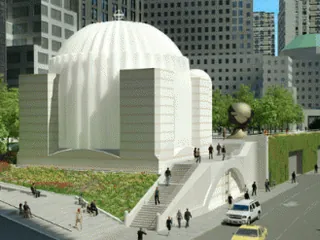
A recreation of the proposed New World Trade Center in Lower Manhattan, NY.
World Includes 40+ buildings, including the World Financial Center complex & World Trade Center complex. Its a project in progress. Some buildings are furnished in the interiors. some have stories, and elevator shafts; some havent got these or are missing some because I havent worked on them. Right now I am in the process of replacing jukebox wondows, with light blue stained glass. (The jukebox is transparent due to my texture pack) The world is magnificent. My favorite building is the Wtc Transportation hub, The all White building with "wings protruding form the sides. TO GET THE FULL EXPERIENCE OF THE WORLD PLEASE DOWNLOAD THE TEXTURE PACK BELOW
http://www.mediafire.com/download/14t88davwdm42ha/World_Trade_Center_Pack.5.zip
What you need to do is.
1) Click the link, and download the texture pack.
2) Go to your Appdata folder.
To do this heres what you do.
If you are on Windows 8 put your cursor to the top right of the screen, and click the magnifying glass icon that pops up (it should say search). Then type in "Run" in the search box. An app called Run should come up, open it. A box will come up on your desktop. In it type in "%appdata%" and click OK. Posted Image
A folder should pop up, it'll should be called "Roaming". In that there will be a folder called ".minecraft" find it and open it. Once you open it find a folder called "versions", open that. Leave it open.
If you are on windows 7, just click the start button, and in the search type in %appdata% there, a folder will be called Roaming will come up, open it, and basically the same as on windows 8 from there.
3) Once it is finished downloading open the texture pack with Winrar or whatever archiver you use. There will be a folder called World Trade Center Pack. Just drag it from Winrar into the versions folder that you've already opened.
4) When you open Minecraft launcher just go to edit profile, find the "Use Version", just click down and somewhere should be "release World Trade Center Pack", click that so you'll be using it. Then put Save Profile. or save. Whatever it says.
ENJOY GUYS
MAJOR UPDATE
A recreation of the proposed New World Trade Center in Lower Manhattan, NY.
World Includes 40+ buildings, including the World Financial Center complex & World Trade Center complex. Its a project in progress. Some buildings are furnished in the interiors. some have stories, and elevator shafts; some havent got these or are missing some because I havent worked on them. Right now I am in the process of replacing jukebox wondows, with light blue stained glass. (The jukebox is transparent due to my texture pack) The world is magnificent. My favorite building is the Wtc Transportation hub, The all White building with "wings protruding form the sides. TO GET THE FULL EXPERIENCE OF THE WORLD PLEASE DOWNLOAD THE TEXTURE PACK BELOW
http://www.mediafire.com/download/14t88davwdm42ha/World_Trade_Center_Pack.5.zip
What you need to do is.
1) Click the link, and download the texture pack.
2) Go to your Appdata folder.
To do this heres what you do.
If you are on Windows 8 put your cursor to the top right of the screen, and click the magnifying glass icon that pops up (it should say search). Then type in "Run" in the search box. An app called Run should come up, open it. A box will come up on your desktop. In it type in "%appdata%" and click OK. Posted Image
A folder should pop up, it'll should be called "Roaming". In that there will be a folder called ".minecraft" find it and open it. Once you open it find a folder called "versions", open that. Leave it open.
If you are on windows 7, just click the start button, and in the search type in %appdata% there, a folder will be called Roaming will come up, open it, and basically the same as on windows 8 from there.
3) Once it is finished downloading open the texture pack with Winrar or whatever archiver you use. There will be a folder called World Trade Center Pack. Just drag it from Winrar into the versions folder that you've already opened.
4) When you open Minecraft launcher just go to edit profile, find the "Use Version", just click down and somewhere should be "release World Trade Center Pack", click that so you'll be using it. Then put Save Profile. or save. Whatever it says.
ENJOY GUYS
The Enchanted Cave Spawn 9.7M
0 downloads0 comments
Explore the depths of this enchanted cave and use it is a great hub or spawn for your server. Flowing rivers, mysterious glowing trees and unique lighting create an impressive environment for players to start their adventure.
The world is already set up with portals if you want to use it as a hub for a server network.
Thanks to http://apexminecrafthosting.com for server hosting on this project.
The world is already set up with portals if you want to use it as a hub for a server network.
Thanks to http://apexminecrafthosting.com for server hosting on this project.